Showing posts with label SoftwareArchitect. Show all posts

Architecture of the scalability evolution - Single Server to a Global Audience

Kết quả hình ảnh cho scalability server aws

As a young engineer I used to build web applications that were hosted on a single server, and this is probably how most of us get started. During my career I have worked for different companies and I have witnessed applications in different scalability evolution stages. Before we go deeper into scalability, I would like to present some of these evolution stages to better explain how you go from a single server sitting under your desk to thousands of servers spread all over the world. I will keep it at a very high level here, as I will go into more detail in later chapters. Discussing evolution stages will also allow me to introduce different concepts and gradually move toward more complex topics. Keep in mind that many of the scalability evolution stages presented here can only work if you plan for them from the beginning. In most cases, a real-world system would not evolve exactly in this way, as it would likely need to be rewritten a couple of times. Most of the time, a system is designed and born in a particular evolution stage and remains in it for its lifetime, or manages to move up one or two steps on the ladder before reaching its architectural limits.

Single-Server Configuration 

Let’s begin with a single-server setup, as it is the simplest configuration possible and this is how many small projects get started. In this scenario, I assume that your entire application runs on a single machine. Figure 1-1 shows how all the traffic for every user request is handled by the same server. Usually, the Domain Name System (DNS) server is used as a paid service provided by the hosting company and is not running on your own server. In this scenario, users connect to the DNS to obtain the Internet Protocol (IP) address of the server where your website is hosted. Once the IP address is obtained, they send Hypertext Transfer Protocol (HTTP) requests directly to your web server. Since your setup consists of only one machine, it needs to perform all the duties necessary to make your application run. It may have a database management system running (like MySQL or Postgres), as well as serving images and dynamic content from within your application.


Figure 1-1 shows the distribution of traffic in a single-server configuration. Clients would first connect to the DNS server to resolve the IP address of your domain, and then they would start requesting multiple resources from your web server. Any web pages, images, Cascading Style Sheet (CSS) files, and videos have to be generated or served by your server, and all of the traffic and processing will have to be handled by your single machine. I use different weights of arrows on the diagram to indicate the proportion of traffic coming to each component. An application like this would be typical of a simple company website with a product catalog, a blog, a forum, or a self-service web application. Small websites may not even need a dedicated server and can often be hosted on a virtual private server (VPS) or on shared hosting

For sites with low traffic, a single-server configuration may be enough to handle the requests made by clients. There are many reasons, though, why this configuration is not going to take you far scalability-wise:
 ▶ Your user base grows, thereby increasing traffic. Each user creates additional load on the servers, and serving each user consumes more resources, including memory, CPU time, and disk input/output (I/O).
▶ Your database grows as you continue to add more data. As this happens, your database queries begin to slow down due to the extra CPU, memory, and I/O requirements.
▶ You extend your system by adding new functionality, which makes user interactions require more system resources.
▶ You experience any combination of these factors.

Making the Server Stronger: Scaling Vertically
There are a number of ways to scale vertically:
▶ Adding more I/O capacity by adding more hard drives in Redundant Array of Independent Disks (RAID) arrays. I/O throughput and disk saturation are the main bottlenecks in database servers. Adding more drives and setting up a RAID array can help to distribute reads and writes across more devices. In recent years, RAID 10 has become especially popular, as it gives both redundancy and increased throughput. From an application perspective, a RAID array looks like a single volume, but underneath it is a collection of drives sharing the reads and writes.
▶ Improving I/O access times by switching to solid-state drives (SSDs). Solid-state drives are becoming more and more popular as the technology matures and prices continue to fall. Random reads and writes using SSDs are between 10 and 100 times faster, depending on benchmark methodology. By replacing disks you can decrease I/O wait times in your application. Unfortunately, sequential reads and writes are not much faster and you will not see such a massive performance increase in real-world applications. In fact, most open-source databases (like MySQL) optimize data structures and algorithms to allow more sequential disk operations rather than depending on random access I/O. Some data stores, such as Cassandra, go even further, using solely sequential I/O for all writes and most reads, making SSD even less attractive.
▶ Reducing I/O operations by increasing RAM. (Even 128GB RAM is affordable nowadays if you are hosting your application on your own dedicated hardware.) Adding more memory means more space for the file system cache and more working memory for the applications. Memory size is especially important for efficiency of database servers.
▶ Improving network throughput by upgrading network interfaces or installing additional ones. If your server is streaming a lot of video/media content, you may need to upgrade your network provider’s connection or even upgrade your network adapters to allow greater throughput.
▶ Switching to servers with more processors or more virtual cores. Servers with 12 and even 24 threads (virtual cores) are affordable enough to be a reasonable scaling option. The more CPUs and virtual cores, the more processes that can be executing at the same time. Your system becomes faster, not only because processes do not have to share the CPU, but also because the operating system will have to perform fewer context switches to execute multiple processes on the same core.

Figure 1-2 shows the approximate relationship of price per capacity unit and the total capacity needed. It shows that you can scale up relatively cheaply first, but beyond a certain point, adding more capacity becomes extremely expensive. For example, getting 128GB of RAM (as of this writing) could cost you $3,000, but doubling that to 256GB could cost you $18,000, which is much more than double the 128GB price.


Isolation of Services
Vertical scalability is not the only option at this early stage of evolution. Another simple solution is moving different parts of the system to separate physical servers by installing each type of service on a separate physical machine. In this context, a service is an application like a web server (for example, Apache) or a database engine (for example, MySQL). This gives your web server and your database a separate, dedicated machine. In the same manner, you can deploy other services like File Transfer Protocol (FTP), DNS, cache, and others, each on a dedicated physical machine.

Cache is a server/service focused on reducing the latency and resources needed to generate the result by serving previously generated content. Caching is a very important technique for scalability.

Content Delivery Network: Scalability for Static Content
As applications grow and get more customers, it becomes beneficial to offload some of the traffic to a third-party content delivery network (CDN) service.


A content delivery network is a hosted service that takes care of global distribution of static files like images, JavaScript, CSS, and videos. It works as an HTTP proxy. Clients that need to download images, JavaScript, CSS, or videos connect to one of the servers owned by the CDN provider instead of your servers. If the CDN server does not have the requested content yet, it asks your server for it and caches it from then on. Once the file is cached by the CDN, subsequent clients are served without contacting your servers at all.


Distributing the Traffic: Horizontal Scalability 

All of the evolution stages discussed so far were rather simple modifications to the single-server configuration. Horizontal scalability, on the other hand, is much harder to achieve and in most cases it has to be considered before the application is built. In some rare cases, it can be “added” later on by modifying the architecture of the application, but it usually requires significant development effort. I will describe different horizontal scalability techniques throughout this book, but for now, let’s think of it as running each component on multiple servers and being able to add more servers whenever necessary. Systems that are truly horizontally scalable do not need strong servers—quite the opposite; they usually run on lots and lots of cheap “commodity” servers rather than a few powerful machines.


Scalability for a Global Audience
The largest of websites reach the final evolution stage, which is scalability for a global audience. Once you serve millions of users spread across the globe, you will require more than a single data center. A single data center can host plenty of servers, but it causes clients located on other continents to receive a degraded user experience. 

GeoDNS is a DNS service that allows domain names to be resolved to IP addresses based on the location of the customer. Regular DNS servers receive a domain name, like yahoo.com, and resolve it to an IP address, like 206.190.36.45. GeoDNS behaves the same way from the client’s perspective.

Edge cache is a HTTP cache server located near the customer, allowing the customer to partially cache the HTTP traffic. Requests from the customer’s browser go to the edge-cache server. The server can then decide to serve the page from the cache, or it can decide to assemble the missing pieces of the page by sending background requests to your web servers. It can also decide that the page is uncacheable and delegate fully to your web servers. Edge-cache servers can serve entire pages or cache fragments of HTTP responses. 


A load balancer is a software or hardware component that distributes traffic coming to a single IP address over multiple servers, which are hidden behind the load balancer. Load balancers are used to share the load evenly among multiple servers and to allow dynamic addition and removal of machines. Since clients can only see the load balancer, web servers can be added at any time without service disruption.

The second layer of our stack is the web application layer. It consists of web application servers (4) responsible for generating the actual HTML of our web application and handling clients’ HTTP requests. These machines would often use a lightweight (PHP, Java, Ruby, Groovy, etc.) web framework with a minimal amount of business logic, since the main responsibility of these servers is to render the user interface. All the web application layer is supposed to do is handle the user interactions and translate them to internal web services calls. The simpler and “dumber” the web application layer, the better. By pushing most of your business logic to web services, you allow more reuse and reduce the number of changes needed, since the presentation layer is the one that changes most often.

The third layer of our stack consists of web services (7). It is a critical layer, as it contains most of our application logic. We keep front-end servers simple and free of business logic since we want to decouple the presentation layer from the business logic. By creating web services, we also make it easier to create functional partitions. We can create web services specializing in certain functionality and scale them independently. For example, in an e-commerce web application, you could have a product catalog service and a user profile service, each providing very different types of functionality and each having very different scalability needs.

Both front-end servers (4) and web services (7) should be stateless, web applications often deploy additional components, such as object caches (5) and message queues (6). Object cache servers are used by both front-end application servers and web services to reduce the load put on the data stores and speed up responses by storing partially precomputed results. 

Data persistence layer (8) and (9). This is usually the most difficult layer to scale horizontally, so we’ll spend a lot of time discussing different scaling strategies and horizontal scalability options in that layer. This is also an area of rapid development of new technologies labeled as big data and NoSQL, 

The data layer has become increasingly more exciting in the past ten years, and the days of a single monolithic SQL database are gone. As Martin Fowler says, it is an era of polyglot persistence, where multiple data stores are used by the same company to leverage their unique benefits and to allow better scalability. 


Overview of the Application Architecture
So far, we’ve looked at the infrastructure and scalability evolution stages. Let’s now take a high-level look at the application itself. The application architecture should not revolve around a framework or any particular technology. Architecture is not about Java, PHP, PostgreSQL, or even database schema. Architecture should evolve around the business model. There are some great books written on domain-driven design and software architecture1–3 that can help you get familiar with best practices of software design. To follow these best practices, we put business logic in the center of our architecture. It is the business requirements that drive every other decision. Without the right model and the right business logic, our databases, message queues, and web frameworks are useless. Moreover, it is irrelevant if the application is a social networking website, a pharmaceutical service, or a gambling app—it will always have some business needs and a domain model. By putting that model in the center of our architecture, we make sure that other components surrounding it serve the business, not the other way around. By placing technology first, we may get a great Rails application, but it may not be a great pharmaceutical application.t1

A domain model is created to represent the core functionality of the application in the words of business people, not technical people. The domain model explains key terms, actors, and operations, without caring about technical implementation. The domain model of an automated teller machine (ATM) would mention things like cash, account, debit, credit, authentication, security policies, etc. At the same time, the domain model would be oblivious to hardware and software implementation of the problem. The domain model is a tool to create our mental picture of the business problems that our application is supposed to solve


The front end should have a single responsibility of becoming the user interface. The user can be interacting with the application via web pages, mobile applications, or web service calls. No matter what the actual delivery mechanism is, the front-end application should be the layer translating between the public interface and internal service calls. The front end should be considered as “skin,” or a plugin of the application, and as something used to present the functionality of the system to customers. It should not be considered a heart or the center of the system

Front-end code will be closely coupled to templates and the web framework of our choice (for example, Spring, Rails, Symfony). It will be constrained by the user interface, user experience requirements, and the web technologies used. Frontend applications will have to be developed in a way that will allow communication over HTTP, including AJAX and web sessions. By hiding that within the front-end layer, we can keep our services layer simpler and focused solely on the business logic, not on the presentation and web-specific technologies. Templating, web flows, and AJAX are all specific problems. Keeping them separated from your main business logic allows for fast and independent changes. Having the front end developed as a separate application within our system gives us another advantage: we can use a different technology stack to develop it. It is not unreasonable to use one technology to develop web services and a different one to develop the front-end application. 

As an example, you could develop the front end using Groovy, PHP, or Ruby, and web services could be developed in pure Java.

Web services are where most of the processing has to happen, and also the place where most of the business logic should live. 


Solution Architecture vs. Software Architecture

Solution Architecture

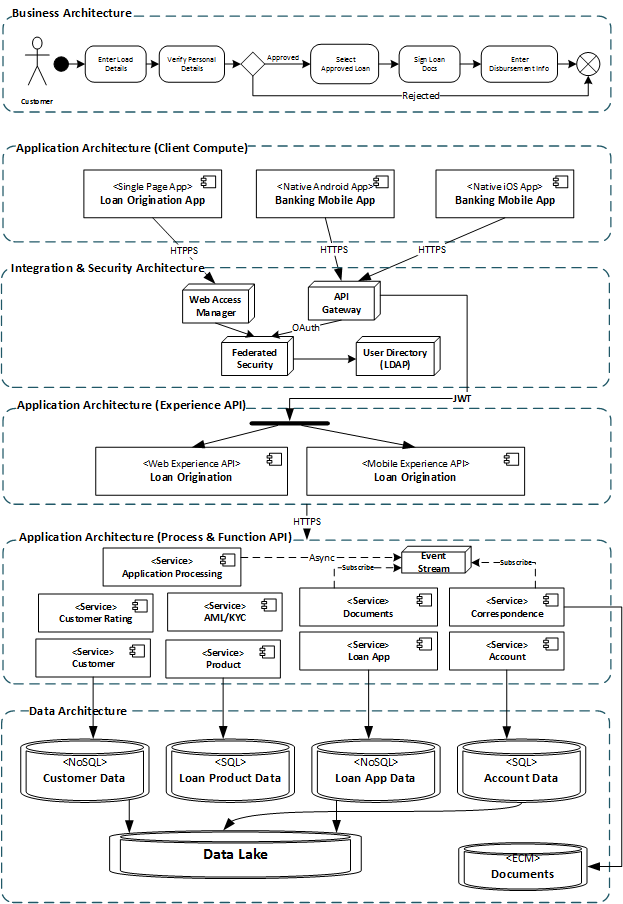
The term "solution architecture" is used to describe the process of developing, documenting, and reviewing with relevant stakeholders a multi-dimensional architecture construct that enables a specific business or operational outcome. The target architecture that enables this outcome is defined within the context of all impacted and applicable architecture domains such as business, data, application, technology, integration, security, etc. A solution architecture document will elaborate and further decompose the target architecture into architecture deliverables for each architecture domain. For example, the solution architecture for a loan application digital channel at a fictional bank to allow bank’s customers to apply for a loan online will require an impact assessment of each architecture domain. Each domain will address the needs and concerns of the impacted stakeholders who are bound by that domain such as business, technology, operational, risk, legal, etc…
Image title
Let’s try to segregate some of these concerns into specific architecture domains:
  • Business Architecture: How does a customer apply for a loan online?
  • Data Architecture: What information is needed to enable loan risk assessment and processing? How to manage customer info with maximum security, integrity and optimal cost, performance, reliability, consistency?
  • Application Architecture: What UX, process management, and functional system components/services are needed to enable customer loan application via mobile and web devices?
  • Integration Architecture: How will the distributed application component and services talk to each other?
  • Security Architecture: How to properly verify and authenticate customer identity? How to ensure that customer data is secure in a distributed environment? How to prevent unauthorized data access and data theft over the wire?
  • Technology Architecture: How to configure supporting infrastructure for high availability and recoverability in case of system or facility failure?
  • DevOps Architecture: How to enable rapid product delivery and continuous maintenance?
The solution architecture that best addresses these concerns will be derived by applying a formal architecture development process and incorporating established organization’s architecture principles and reference architecture in order to define the most optimal technology solution that delivers the desired business outcome. The solution architecture must be well documented and presented to the project and architecture review boards to ensure that it satisfies the project constraints and technology standards established by the enterprise/chief architect.
The figure above is a sample of a few common solution architecture diagrams for a loan application use case. Please note that the actual solution architecture document will also contain a detail description of each domain target architecture and gaps. Other architecture artifacts such as catalogs and matrices may be used.

Software Architecture

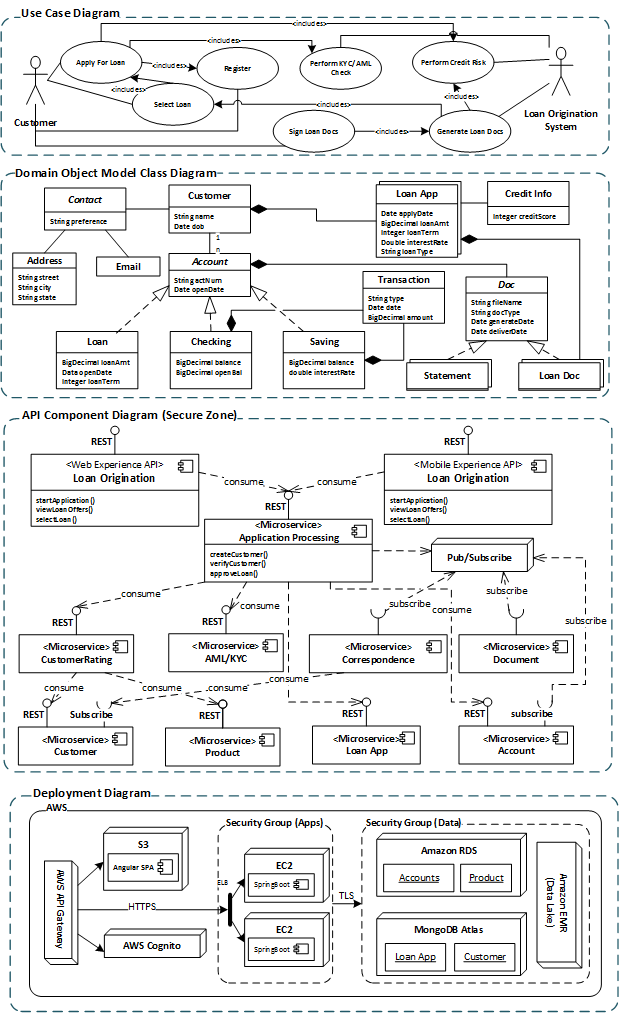
Once the solution architecture is defined, reviewed, and approved, software architecture can now be developed as part of the Design or Architectural Runway SDLC phase. The primary focus of software architecture is to define and document software structure and behavior in order to enable software engineering and delivery based on known functional and non-functional requirements. This is quite different from the goal of solution architecture, which is to define app, data, infra architecture building blocks, dependencies, and address all relevant stakeholders’ concerns. Software architect, usually also a technology SME, will use architecture styles, object oriented analysis and software design patterns to design client and server side software components that implement the web/mobile customer experience (CX), process management, functional and data management application architecture blocks defined in the solution architecture document. As I mentioned, the focus of software architecture is to enable application development and delivery. The software engineering diagrams that I found most useful in my days as a software architect are the domain object model class, service component, sequence, and deployment diagrams.
Image title
  • Domain Object Model Class Diagram is essential in defining a consistent data format for information management, persistence, and sharing.
  • Services Component Diagram breaks down system functional services into self-contained API components that can be implemented as microservices
  • Sequence Diagram demonstrates how software modules and distributed components integrate with one another in a context of each use case.
  • Deployment Diagram is necessary to demonstrate software deployment on compute and middleware infrastructure in order to engineer a DevOps pipeline, manage software/infrastructure dependencies, and design for performance and failure

Cloud Native Application Architecture


Introduction

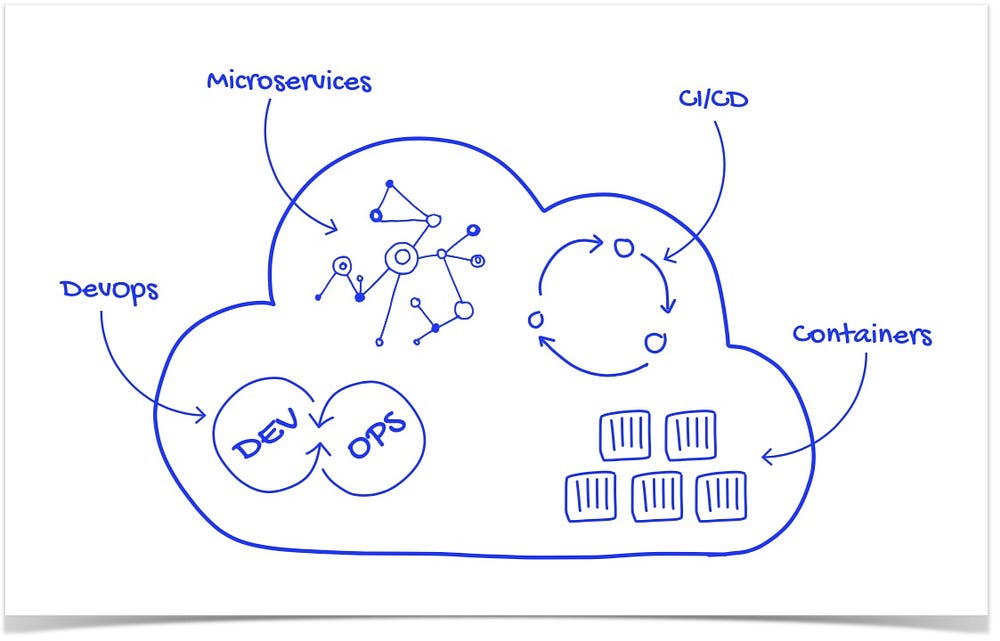
Cloud native is an approach for building applications as micro-services and running them on a containerised and dynamically orchestrated platforms that fully exploits the advantages of the cloud computing model. Cloud-native is about how applications are created and deployed, not where. Such technologies empower organisations to build and run scalable applications in modern, dynamic environments such as public, private, and hybrid clouds. These applications are built from the ground up, designed as loosely coupled systems, optimised for cloud scale and performance, use managed services and take advantage of continuous delivery to achieve reliability and faster time to market. The overall objective is to improve speed, scalability and, finally, margin.
Speed — Companies of all sizes now see a strategic advantage in being able to move quickly and get ideas to market fast. By this, we mean moving from months to get an idea into production to days or even hours. Part of achieving this is a cultural shift within a business, transitioning from big bang projects to more incremental improvements. At its heart, a Cloud Native strategy is about handling technical risk. In the past, our standard approach to avoiding danger was to move slowly and carefully. The Cloud Native approach is about moving quickly by taking small, reversible and low-risk steps.
Scalability — As businesses grow, it becomes strategically necessary to support more users, in more locations, with a broader range of devices, while maintaining responsiveness, managing costs and not falling over
Margin — In the new world of cloud infrastructure, the strategic goal is to be to pay for additional resources only as needed — as new customers come online. Spending moves from up-front CAPEX (buying new machines in anticipation of success) to OPEX (paying for additional servers on-demand).

Role Of CNCF

Cloud Native Computing Foundation is an open source software foundation housed in the Linux Foundation and includes big names such as Google, IBM, Intel, Box, Cisco, and VMware etc, dedicated to making cloud-native computing universal and sustainable. Cloud native computing uses an open source software stack to deploy applications as microservices, packaging each part into its own container, and dynamically orchestrating those containers to optimize resource utilisation. According to the FAQ on why CNCF is needed — Companies are realising that they need to be a software company, even if they are not in the software business. For example, Airbnb is revolutionising the hospitality industry and more traditional hotels are struggling to compete. Cloud native allows IT and software to move faster. Adopting cloud-native technologies and practices enables companies to create software in-house, allows business people to closely partner with IT people, keep up with competitors and deliver better services to their customers.

Cloud Native Design Principles

Designed As Loosely Coupled Microservices

Microservice is an approach to develop a single application as a suite of small services, each running in their own process and communicating using lightweight protocols like HTTP. These services are built around business capabilities and are independently deployable by fully automated deployment machinery.

Developed With Best-of-breed Languages And Frameworks

Each service of a cloud-native application is developed using the language and framework best suited for the functionality. Cloud-native applications are polyglot. Services use a variety of languages, runtimes and frameworks. For example, developers may build a real-time streaming service based on WebSockets, developed in Node.js, while choosing Python for building a machine learning based service and choosing spring-boot for exposing the REST APIs. The fine-grained approach to developing microservices lets them choose the best language and framework for a specific job.

Centred Around APIs For Interaction And Collaboration

Cloud-native services use lightweight APIs that are based on protocols such as representational state transfer (REST) to expose their functionality. Internal services communicate with each other using binary protocols like Thrift, Protobuff, GRPC etc for better performance

Stateless And Massively Scalable

A cloud-native app stores its state in a database or some other external entity so instances can come and go. Any instance can process a request. They are not tied to the underlying infrastructure which allows the app to run in a highly distributed manner and still maintain its state independent of the elastic nature of the underlying infrastructure. From a scalability perspective, the architecture is as simple as just by adding commodity server nodes to the cluster, it should be possible to scale the application

Resiliency At The Core Of the Architecture

According to Murphy’s law — “Anything that can fail will fail”. When we apply this to software systems, In a distributed system, failures will happen. Hardware can fail. The network can have transient failures. Rarely, an entire service or region may experience a disruption, but even those must be planned for. Resiliency is the ability of a system to recover from failures and continue to function. It’s not about avoiding failures, but responding to failures in a way that avoids downtime or data loss. The goal of resiliency is to return the application to a fully functioning state following a failure. Resiliency offers the following:
  • High Availability — the ability of the application to continue running in a healthy state, without significant downtime
  • Disaster Recovery — the ability of the application to recover from rare but major incidents: non-transient, wide-scale failures, such as service disruption that affects an entire region
One of the main ways to make an application resilient is through redundancy. HA and DR are implemented using multi node clusters, Multi region deployments, data replication, no single point of failure, continuous monitoring etc.
Following are some of the strategies for implementing resiliency:
  • Retry transient failures — Transient failures can be caused by momentary loss of network connectivity, a dropped database connection, or a timeout when a service is busy. Often, a transient failure can be resolved simply by retrying the request
  • Load balance across instances — Implement cluster everywhere. Stateless applications should be able to scale by adding more nodes to the cluster
  • Degrade gracefully — If a service fails and there is no failover path, the application may be able to degrade gracefully while still providing an acceptable user experience
  • Throttle high-volume tenants/users — Sometimes a small number of users create excessive load. That can have an impact on other users, reducing the overall availability of your application
  • Use a circuit breaker — The circuit breaker pattern can prevent an application from repeatedly trying an operation that is likely to fail. The circuit breaker wraps calls to a service and tracks the number of recent failures. If the failure count exceeds a threshold, the circuit breaker starts returning an error code without calling the service
  • Apply compensating transactions. A compensating transaction is a transaction that undoes the effects of another completed transaction. In a distributed system, it can be very difficult to achieve strong transactional consistency. Compensating transactions are a way to achieve consistency by using a series of smaller, individual transactions that can be undone at each step.
Testing for resiliency — Normally resiliency testing cannot be done the same way that you test application functionality (by running unit tests, integration tests and so on). Instead, you must test how the end-to-end workload performs under failure conditions which only occur intermittently. For example: inject failures by crashing processes, expired certificates, make dependent services unavailable etc. Frameworks like chaos monkey can be used for such chaos testing.

Packaged As Lightweight Containers And Orchestrated

Containers make it possible to isolate applications into small, lightweight execution environments that share the operating system kernel. Typically measured in megabytes, containers use far fewer resources than virtual machines and start up almost immediately. Docker has become the standard for container technology. The biggest advantage they offer is portability.
Cloud-native applications are deployed using Kubernetes which is an open source platform designed for automating deployment, scaling, and management of containerised applications. Originally developed at Google, Kubernetes has become the operating system for deploying cloud-native applications. It is also one of the first few projects to get graduated at CNCF.

Agile DevOps & Automation Using CI/CD

DevOps, the amalgamation of “development” and “operations describes the organisational structure, practices, and culture needed to enable rapid agile development and scalable, reliable operations. DevOps is about the culture, collaborative practices, and automation that aligns development and operations teams so they have a single mindset on improving customer experiences, responding faster to business needs, and ensuring that innovation is balanced with security and operational needs. Modern organisations believe in merging of development and operational people and responsibilities so that one DevOps team carries both responsibilities. In that way you just have one team who takes the responsibility of development, deployment and running the software in production.
Continuous Integration & Continuous Delivery
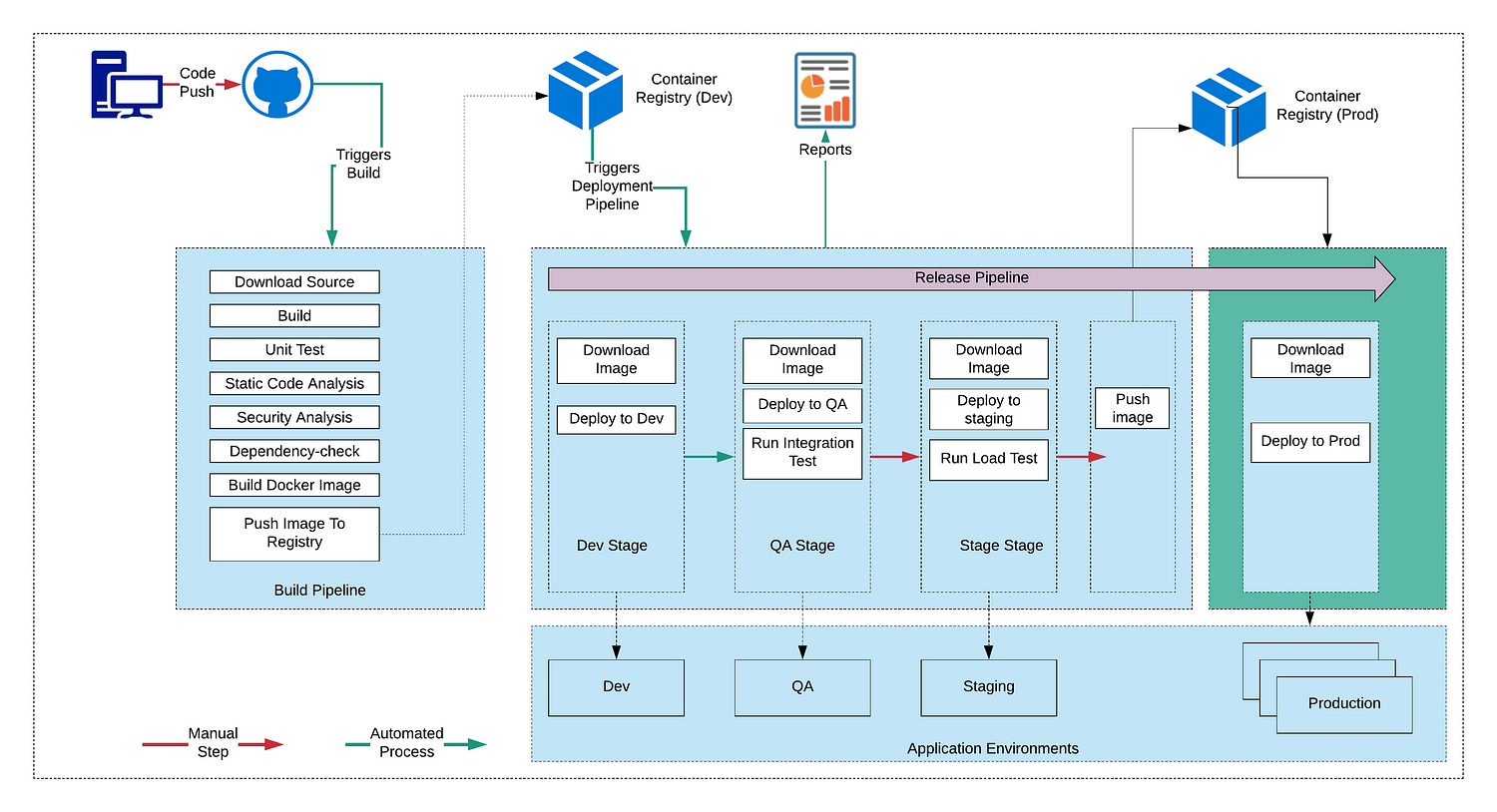
Continuous integration (CI) and continuous delivery (CD) is a set of operating principles that enable application development teams to deliver code changes more frequently and reliably. The technical goal of CI is to establish a consistent and automated way to build, package, and test applications. With consistency in the integration process in place, teams are more likely to commit code changes more frequently, which leads to better collaboration and software quality.
Continuous delivery picks up where continuous integration ends. CD automates the delivery of applications to selected infrastructure environments. It picks up the package built by CI, deploys into multiple environments like Dev, QA, Performance, Staging runs various tests like integration tests, performance tests etc and finally deploys into production. Continuous delivery normally has few manual steps in the pipeline whereas continuous deployment is a fully automated pipeline which automates the complete process from code checkin to production deployment.

Elastic — Dynamic scale-up/down

Cloud-native apps take advantage of the elasticity of the cloud by using increased resources during a use spike. If your cloud-based e-commerce app experiences a spike in use, you can have it set to use extra compute resources until the spike subsides and then turn off those resources. A cloud-native app can adjust to the increased resources and scale as needed.

The top 5 software architecture patterns: How to make the right choice


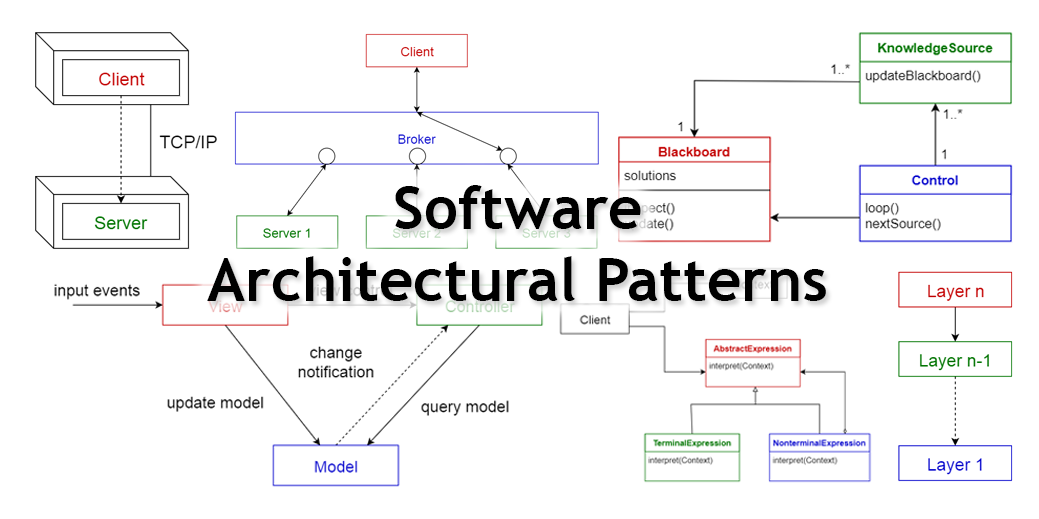
Image result for software architecture patterns

How many plots are there in Hollywood movies? Some critics say there are only five. How many ways can you structure a program? Right now, the majority of programs use one of five architectures.
Mark Richards is a Boston-based software architect who’s been thinking for more than 30 years about how data should flow through software. His new (free) book, Software Architecture Patterns, focuses on five architectures that are commonly used to organize software systems. The best way to plan new programs is to study them and understand their strengths and weaknesses.
In this article, I’ve distilled the five architectures into a quick reference of the strengths and weaknesses, as well as optimal use cases. Remember that you can use multiple patterns in a single system to optimize each section of code with the best architecture. Even though they call it computer science, it’s often an art.

Layered (n-tier) architecture
Event-driven architecture
Microkernel architecture
Microservices architecture
Space-based architecture
x
This approach is probably the most common because it is usually built around the database, and many applications in business naturally lend themselves to storing information in tables.
This is something of a self-fulfilling prophecy. Many of the biggest and best software frameworks—like Java EE, Drupal, and Express—were built with this structure in mind, so many of the applications built with them naturally come out in a layered architecture.
The code is arranged so the data enters the top layer and works its way down each layer until it reaches the bottom, which is usually a database. Along the way, each layer has a specific task, like checking the data for consistency or reformatting the values to keep them consistent. It’s common for different programmers to work independently on different layers.
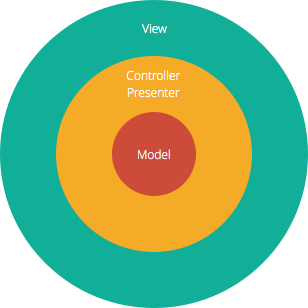
Image credit: Izhaki
The Model-View-Controller (MVC) structure, which is the standard software development approach offered by most of the popular web frameworks, is clearly a layered architecture. Just above the database is the model layer, which often contains business logic and information about the types of data in the database. At the top is the view layer, which is often CSS, JavaScript, and HTML with dynamic embedded code. In the middle, you have the controller, which has various rules and methods for transforming the data moving between the view and the model.
The advantage of a layered architecture is the separation of concerns, which means that each layer can focus solely on its role. This makes it:
  • Maintainable
  • Testable
  • Easy to assign separate "roles"
  • Easy to update and enhance layers separately
Proper layered architectures will have isolated layers that aren’t affected by certain changes in other layers, allowing for easier refactoring. This architecture can also contain additional open layers, like a service layer, that can be used to access shared services only in the business layer but also get bypassed for speed.
Slicing up the tasks and defining separate layers is the biggest challenge for the architect. When the requirements fit the pattern well, the layers will be easy to separate and assign to different programmers.
Caveats:
  • Source code can turn into a “big ball of mud” if it is unorganized and the modules don’t have clear roles or relationships.
  • Code can end up slow thanks to what some developers call the “sinkhole anti-pattern.” Much of the code can be devoted to passing data through layers without using any logic.
  • Layer isolation, which is an important goal for the architecture, can also make it hard to understand the architecture without understanding every module.
  • Coders can skip past layers to create tight coupling and produce a logical mess full of complex interdependencies.
  • Monolithic deployment is often unavoidable, which means small changes can require a complete redeployment of the application.
Best for:
  • New applications that need to be built quickly
  • Enterprise or business applications that need to mirror traditional IT departments and processes
  • Teams with inexperienced developers who don’t understand other architectures yet
  • Applications requiring strict maintainability and testability standards
Many programs spend most of their time waiting for something to happen. This is especially true for computers that work directly with humans, but it’s also common in areas like networks. Sometimes there’s data that needs processing, and other times there isn’t.
The event-driven architecture helps manage this by building a central unit that accepts all data and then delegates it to the separate modules that handle the particular type. This handoff is said to generate an “event,” and it is delegated to the code assigned to that type. 

Programming a web page with JavaScript involves writing the small modules that react to events like mouse clicks or keystrokes. The browser itself orchestrates all of the input and makes sure that only the right code sees the right events. Many different types of events are common in the browser, but the modules interact only with the events that concern them. This is very different from the layered architecture where all data will typically pass through all layers. Overall, event-driven architectures:
  • Are easily adaptable to complex, often chaotic environments
  • Scale easily
  • Are easily extendable when new event types appear
Caveats:
  • Testing can be complex if the modules can affect each other. While individual modules can be tested independently, the interactions between them can only be tested in a fully functioning system.
  • Error handling can be difficult to structure, especially when several modules must handle the same events.
  • When modules fail, the central unit must have a backup plan.
  • Messaging overhead can slow down processing speed, especially when the central unit must buffer messages that arrive in bursts.
  • Developing a systemwide data structure for events can be complex when the events have very different needs.
  • Maintaining a transaction-based mechanism for consistency is difficult because the modules are so decoupled and independent.
Best for:
  • Asynchronous systems with asynchronous data flow
  • Applications where the individual data blocks interact with only a few of the many modules
  • User interfaces
Many applications have a core set of operations that are used again and again in different patterns that depend upon the data and the task at hand. The popular development tool Eclipse, for instance, will open files, annotate them, edit them, and start up background processors. The tool is famous for doing all of these jobs with Java code and then, when a button is pushed, compiling the code and running it.
In this case, the basic routines for displaying a file and editing it are part of the microkernel. The Java compiler is just an extra part that’s bolted on to support the basic features in the microkernel. Other programmers have extended Eclipse to develop code for other languages with other compilers. Many don’t even use the Java compiler, but they all use the same basic routines for editing and annotating files.
The extra features that are layered on top are often called plug-ins. Many call this extensible approach a plug-in architecture instead.
Richards likes to explain this with an example from the insurance business: “Claims processing is necessarily complex, but the actual steps are not. What makes it complex are all of the rules.”
The solution is to push some basic tasks—like asking for a name or checking on payment—into the microkernel. The different business units can then write plug-ins for the different types of claims by knitting together the rules with calls to the basic functions in the kernel.
Caveats:
  • Deciding what belongs in the microkernel is often an art. It ought to hold the code that’s used frequently.
  • The plug-ins must include a fair amount of handshaking code so the microkernel is aware that the plug-in is installed and ready to work.
  • Modifying the microkernel can be very difficult or even impossible once a number of plug-ins depend upon it. The only solution is to modify the plug-ins too.
  • Choosing the right granularity for the kernel functions is difficult to do in advance but almost impossible to change later in the game.
Best for:
  • Tools used by a wide variety of people
  • Applications with a clear division between basic routines and higher order rules
  • Applications with a fixed set of core routines and a dynamic set of rules that must be updated frequently
Software can be like a baby elephant: It is cute and fun when it’s little, but once it gets big, it is difficult to steer and resistant to change. The microservice architecture is designed to help developers avoid letting their babies grow up to be unwieldy, monolithic, and inflexible. Instead of building one big program, the goal is to create a number of different tiny programs and then create a new little program every time someone wants to add a new feature. Think of a herd of guinea pigs.
“If you go onto your iPad and look at Netflix’s UI, every single thing on that interface comes from a separate service,” points out Richards. The list of your favorites, the ratings you give to individual films, and the accounting information are all delivered in separate batches by separate services. It’s as if Netflix is a constellation of dozens of smaller websites that just happens to present itself as one service.
This approach is similar to the event-driven and microkernel approaches, but it’s used mainly when the different tasks are easily separated. In many cases, different tasks can require different amounts of processing and may vary in use. The servers delivering Netflix’s content get pushed much harder on Friday and Saturday nights, so they must be ready to scale up. The servers that track DVD returns, on the other hand, do the bulk of their work during the week, just after the post office delivers the day’s mail. By implementing these as separate services, the Netflix cloud can scale them up and down independently as demand changes.
Caveats:
  • The services must be largely independent or else interaction can cause the cloud to become imbalanced.
  • Not all applications have tasks that can’t be easily split into independent units.
  • Performance can suffer when tasks are spread out between different microservices. The communication costs can be significant.
  • Too many microservices can confuse users as parts of the web page appear much later than others.
Best for:
  • Websites with small components
  • Corporate data centers with well-defined boundaries
  • Rapidly developing new businesses and web applications
  • Development teams that are spread out, often across the globe
Many websites are built around a database, and they function well as long as the database is able to keep up with the load. But when usage peaks, and the database can’t keep up with the constant challenge of writing a log of the transactions, the entire website fails.
The space-based architecture is designed to avoid functional collapse under high load by splitting up both the processing and the storage between multiple servers. The data is spread out across the nodes just like the responsibility for servicing calls. Some architects use the more amorphous term “cloud architecture.” The name “space-based” refers to the “tuple space” of the users, which is cut up to partition the work between the nodes. “It’s all in-memory objects,” says Richards. “The space-based architecture supports things that have unpredictable spikes by eliminating the database.”
Storing the information in RAM makes many jobs much faster, and spreading out the storage with the processing can simplify many basic tasks. But the distributed architecture can make some types of analysis more complex. Computations that must be spread out across the entire data set—like finding an average or doing a statistical analysis—must be split up into subjobs, spread out across all of the nodes, and then aggregated when it’s done.
Caveats:
  • Transactional support is more difficult with RAM databases.
  • Generating enough load to test the system can be challenging, but the individual nodes can be tested independently.
  • Developing the expertise to cache the data for speed without corrupting multiple copies is difficult.
Best for:
  • High-volume data like click streams and user logs
  • Low-value data that can be lost occasionally without big consequences—in other words, not bank transactions
  • Social networks
These are Richards' big five. They may be just what you need. And if they’re not, the right solution could be a mixture of two. Or maybe even three. Be sure to download his book for free; it contains a lot more detail. If you can think of more, please let us know in the comments.

The Ultimate XP Project

  (Bài chia sẻ của tác giả  Ryo Amano ) Trong  bài viết  số này, tôi muốn viết về dự án phát triển phần mềm có áp dụng nguyên tắc phát triển...